Help and how-to
Everything you need to book a court, get in after hours, hire gear and make the most of the Park. Short videos and written steps.
Get the app
Padel Park NZ on iPhone and Android: book, pay and find players.
24/7 entry
Your access code works from 15 minutes before your booking.
Hire gear
Rackets and paddles from the vending machine, any time.
Still stuck?
WhatsApp +64 28 407 8645 for anything urgent.
The app
Download Padel Park NZ from the App Store or Google Play. It’s the fastest way to book, pay and find players. No app? Do everything on the web at padelpark-nzl.matchpoint.com.es: same login, same bookings.
Book a court
Pick a time, sport and length, pay for the court, and it’s yours. You can book courts 7 days ahead (14 days for members), and activities and weekly events a month ahead.
Watch: how to book a court in the app · Watch: how to book on the web
Cancelling: members can cancel up to 6 hours before the start for a full refund; non-members up to 12 hours. More in changing or cancelling a booking.
Changing or cancelling a booking
There’s no “move” button: cancel the booking and book the time you want.
- Outside the cancellation window (more than 6 hours before the start for members, 12 hours for non-members): cancel it yourself in the app or on the web. The refund goes straight into your MatchPoint wallet, so you can use it on the new booking straight away. Booked 2am instead of 2pm? This is the fix.
- Inside the window: we can’t refund automatically. WhatsApp us or email office@padelpark.nz and we’ll sort it out.
- Coaching has a 24-hour window, and classes and tournaments 12 hours.
- Running late? That’s between you and your group. Late to an Open Match with people you don’t know? You might be buying the first round afterwards.
Your wallet and payments
Booking refunds always land in your Padel Park wallet (your account balance in the app). Use it for any court booking, coaching or the pro shop; it can’t be used for memberships or the vending machines. Want a refund somewhere else? Email office@padelpark.nz.
- Courts are paid in full by the person who books.
- Top-up bonus: top up $100 or more and we add a bonus percentage to your wallet (for example 10% on $100).
- Paying cash: top up, pay for a booking or hire a racket at the front desk during staffed hours.
- Receipts and invoices: email office@padelpark.nz.
- Vouchers and packs last a year from purchase. See vouchers.
Open Matches
When you know when you want to play but not who with, create an Open Match: a four-player slot, 2 v 2, best of three sets.
- Public: anyone matching your level, gender and competitive/social settings can join. Great for meeting the club or filling a court.
- Private: only people with your link can join. Great for your regular crew or a work group.
An Open Match needs all four places filled. If it isn’t full 30 minutes before the start, it cancels automatically and everyone is refunded to their wallet (this moves to two hours before in a few months). One short? WhatsApp us and we’ll help find a player, or jump in ourselves.
Watch: public and private Open Matches
Upload a score (app only)
Scores from Open Matches feed your ranking and level, so enter them straight after the match. Standard court bookings don’t have scores.
Watch: how to upload your score
Player level
We use a 1.0 to 7.0 level so you’re matched with players of similar ability. Pick your starting level honestly and the system adjusts it from your results.
| Level | What it looks like |
|---|---|
| 1.0–2.9 Beginner | Learning the rules, scoring and positioning; rallying with a cooperative partner. |
| 3.0–4.9 Intermediate | Rallies with intent, a solid serve and volleys, a growing wall game. |
| 5.0–7.0 Advanced | Tactical rallies and shot variety. Levels 5.0 and up are set by the Park. |
To update your level: in the app, tap Profile → Account → Rating → Edit. On the web, go to My Account → My Personal Information → Player Rating → Edit.
Getting in and the lights
Every booking has its own access code, active from 15 minutes before your slot. Find it in the app under My Bookings (it’s in the booking description), or in your confirmation and reminder emails.
- Enter your code on the keypad.
- Press #.
- Push the door handle down and come in.
The court lights come on 5 minutes before your booking and go off 10 minutes after it finishes. Want to keep playing? During staffed hours ask the team, or book more time in the app.
Code or lights not working? Check the time first: the code only works from 15 minutes before, and the lights only come on 5 minutes before. Still stuck? Ring the doorbell during staffed hours, or WhatsApp us any time.
The building is under 24/7 camera surveillance. Your code is for your booking group only: please don’t share it, hold the door for people you don’t know, or prop doors open.
Hire a racket or paddle
Two vending machines on site: standard padel and pickleball hire from $4 an hour, premium padel rackets from $6. Or hire from the pro shop during staffed hours.
Watch: how to use the vending machines
Renting: tap Rent, choose your racket, then pay (a $20 bond is held on your card; it clears in 2–4 business days and only the hire amount is charged). Note your Return Number, and the locker opens. Returning: tap Return, enter your Return Number, and put the racket back in the locker. Charges run in 30-minute blocks, with 10 minutes’ grace either way. Lost your Return Number? WhatsApp us with the time you hired it.
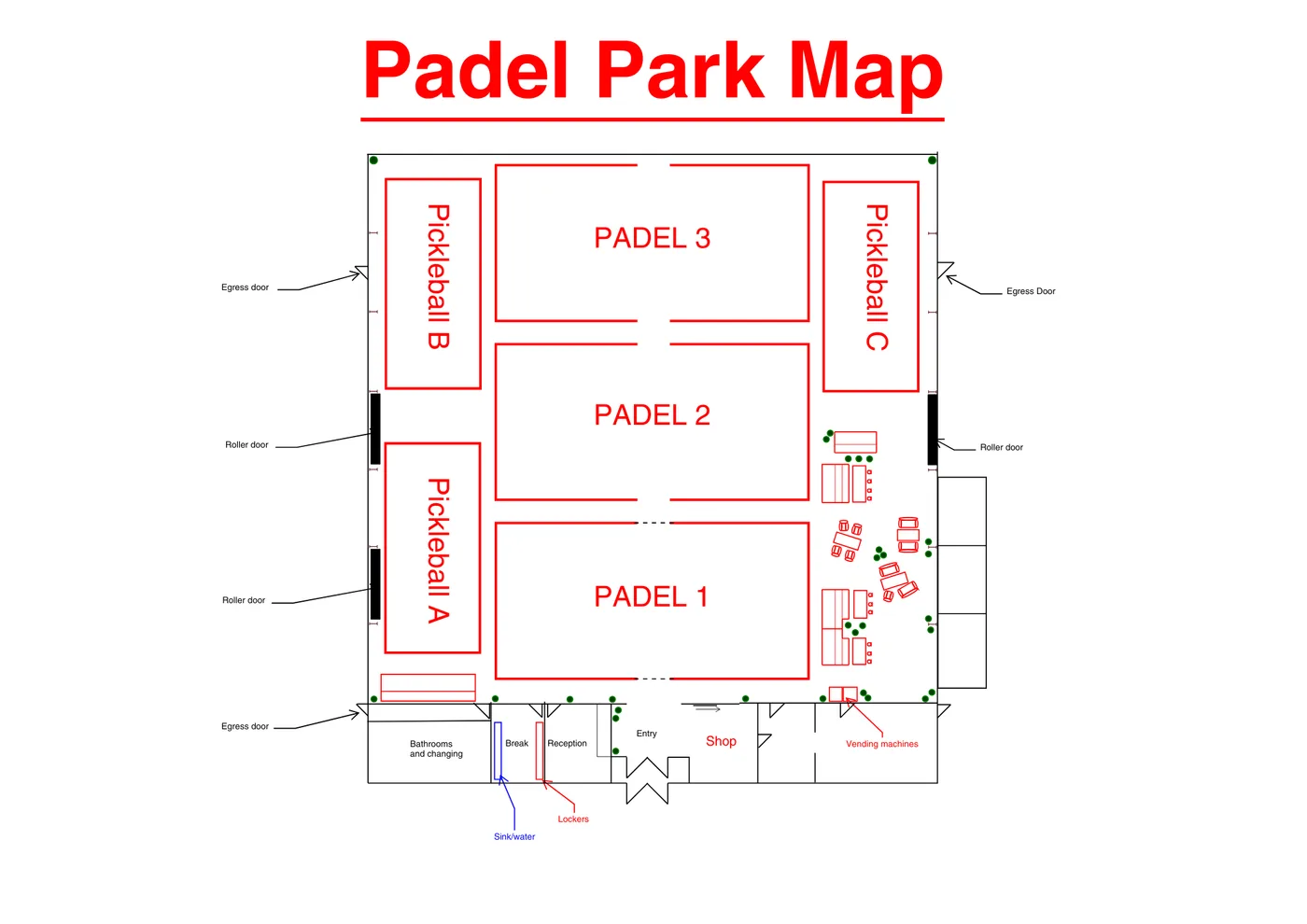
Facility map
Your first visit
- Parking: free, all around the building. The best spots are right in front of the main doors.
- What to bring: clean, non-marking court shoes (no black-soled or marking shoes) and a water bottle (there’s a fountain in the locker room).
- When to arrive: your code works from 15 minutes before your booking, and the lights come on 5 minutes before. During staffed hours, come early, warm up or hang out.
- Check-in: during staffed hours, say hi at reception, then head to your court.
Staffed hours are weekdays 5–10pm and weekends 10am–3pm. Outside those times the Park is still open with your code, just quieter.
Kids and juniors
Kids are very welcome. How much an adult needs to be involved depends on age (below). You need to be 16 to sign up in the app, and there’s no minimum age for coaching: ask us about kids’ coaching and our holiday programmes.
- 16 and over can book and play on their own.
- Under 16 need a parent or guardian to complete the U16 Declaration (from the desk); with it, they can play without an adult.
- Under 14 must be supervised by an adult at the venue at all times.
- After hours, under-16s must be with a parent or guardian, arriving and leaving together.
The full rules are in our safeguarding policy.
House rules
- Shoes: clean, non-marking court shoes. No studs, heels or black-soled shoes.
- Alcohol, smoking and vaping: please don’t bring alcohol for now (we’re applying for a liquor licence and planning a bar). No smoking or vaping inside.
- Dogs are welcome off-court, on a lead. Always pick up after your dog, and check the people around you are happy with it being there.
- Codes are for your booking group only.
- Your belongings are your responsibility; please don’t leave valuables unattended. We’re not responsible for anything lost or damaged at the venue, except where we’ve been negligent.
- Photos: we sometimes take photos and video at the Park for our website and social media. If you’d rather not appear, tell staff on the day or email office@padelpark.nz and we’ll leave you out or take it down. See our Terms.
- Lost property is on the left as you come in, during staffed hours. We keep it for about a month, then donate it to the Salvation Army.
The full terms and conditions apply.
Memberships, passes and vouchers
Once a pass is on your account, the right discount is applied automatically when you book. To use your Park Membership minutes, book as normal, tap Match Pass and choose the minutes voucher. See memberships, students, over 60s and vouchers.
Events, socials and leagues
Everything is bookable in the app (scroll to the bottom of the home screen and tap Activities) or on the web (Make a Booking → Weekly Events / Activities). See what’s on.
Watch: booking an event in the app · Watch: booking an event on the web
Talk to a human
Quick answers to the questions we get most are on the FAQ.
- Something wrong with your court mid-booking: ring +64 28 407 8645 straight away, then WhatsApp the same number.
- Urgent (bookings, door, vending): WhatsApp +64 28 407 8645.
- Everything else: office@padelpark.nz, with a reply within one business day.
- Feedback: comments@padelpark.nz.
- A complaint: talk to the team on the day, or email campbell@padelpark.nz. See our complaints procedure.
During staffed hours you can also ring the doorbell at the main entry.